Getting Started with Kubernetes
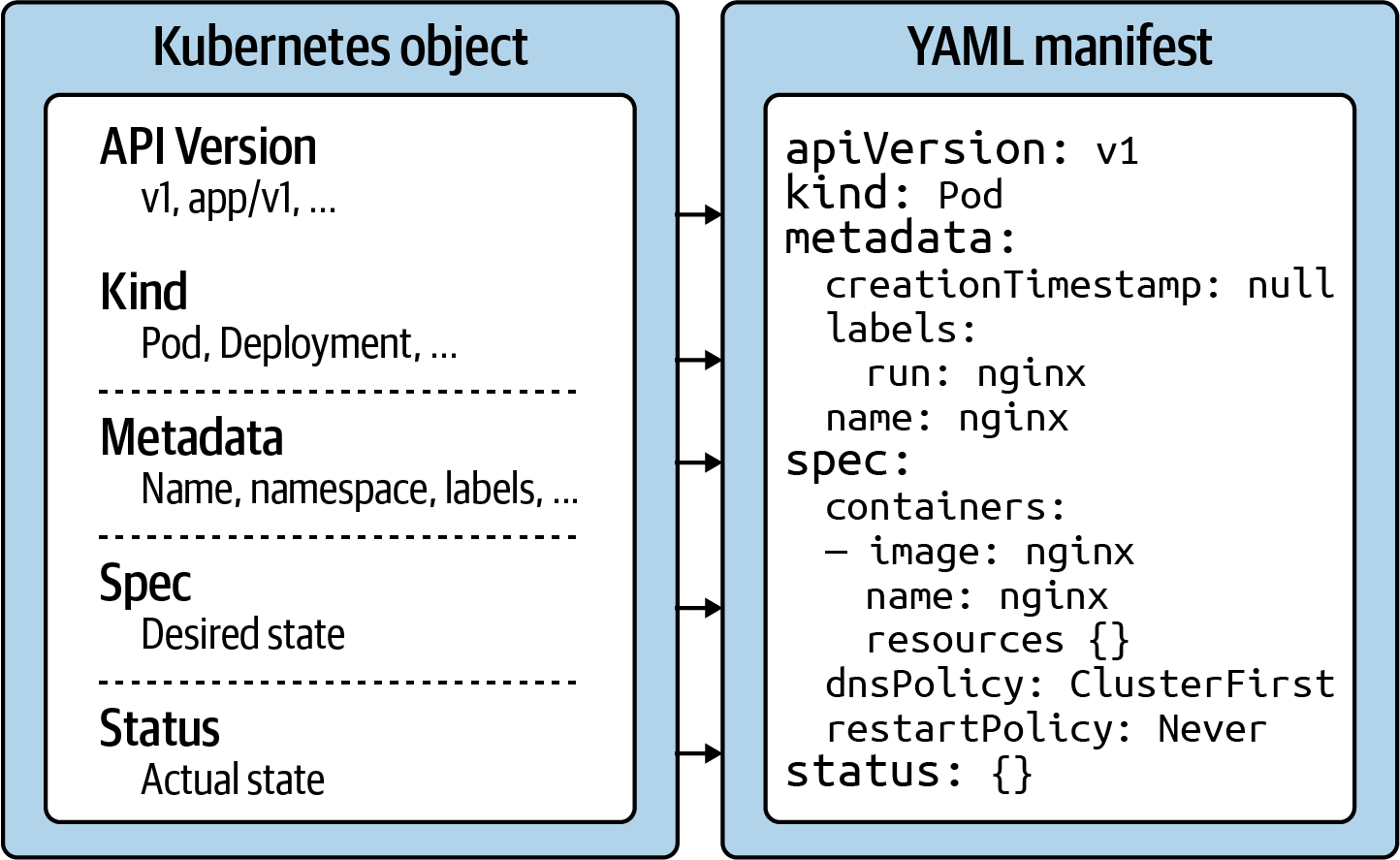
Kubernetes object structure
API version
The Kubernetes API version defines the structure of a primitive and uses it to validate the correctness of the data. The API version serves a similar purpose as XML schemas to a XML document or JSON schemas to a JSON document. The version usually undergoes a maturity process—e.g., from alpha to beta to final. Sometimes you see different prefixes separated by a slash (e.g., apps). You can list the API versions compatible with your cluster version by running the command kubectl api-versions.
Kind
The kind defines the type of primitive—e.g., a Pod or a Service. It ultimately answers the question, “What type of object are we dealing with here?”
Metadata
Metadata describes higher-level information about the object—e.g., its name, what namespace it lives in, or whether it defines labels and annotations. This section also defines the UID.
Spec
The specification (“spec” for short) declares the desired state—e.g., how should this object look after it has been created? Which image should run in the container, or which environment variables should be set for?
Status
The status describes the actual state of an object. The Kubernetes controllers and their reconcilliation loops constantly try to transition a Kubernetes object from the desired state into the actual state. The object has not yet been materialized if the YAML status shows the value {}.
Using kubectl to Interact with the Kubernetes Cluster
kubectl is the primary tool to interact with the Kubernetes clusters from the command line. The CKAD exam is exclusively focused on the use of kubectl. Therefore, it’s paramount to understand its ins and outs and practice its use heavily.
In this section, I want to provide you with a brief overview of its typical usage pattern. Let’s start by looking at the syntax for running commands first. A kubectl execution consists of a command, a resource type, a resource name, and optional command line flags:
kubectl [command] [TYPE] [NAME] [flags]
The command specifies the operation you’re planning to run. Typical commands are verbs like create, get, describe, or delete. Next, you’ll need to provide the resource type you’re working on, either as a full resource type or its short form. For example, you could work on a service here, or use the short form, svc. The name of the resource identifies the user-facing object identifier, effectively the value of metadata.name in the YAML representation. Be aware that the object name is not the same as the UID. The UID is an autogenerated, Kubernetes-internal object reference that you usually don’t have to interact with. The name of an object has to be unique across all objects of the same resource type within a namespace. Finally, you can provide zero to many command line flags to describe additional configuration behavior. A typical example of a command-line flag is the --port flag, which exposes a Pod’s container port.
Imperative Approach
The imperative method for object creation does not require a manifest definition. You would use the kubectl run or kubectl create command to create an object on the fly. Any configuration needed at runtime is provided by command-line options. The benefit of this approach is the fast turnaround time without the need to wrestle with YAML structures:
kubectl run frontend --image=nginx --restart=Never --port=80
Declarative Approach
The declarative approach creates objects from a manifest file (in most cases, a YAML file) using the kubectl create or kubectl apply command. The benefit of using the declarative method is reproducibility and improved maintenance, as the file is checked into version control in most cases. The declarative approach is the recommended way to create objects in production environments:
kubectl create -f pod.yaml
Hybrid Approach
Sometimes, you may want to go with a hybrid approach. You can start by using the imperative method to produce a manifest file without actually creating an object. You do so by executing the kubectl run command with the command-line options -o yaml and --dry-run=client:
kubectl run frontend --image=nginx --restart=Never --port=80 -o yaml --dry-run=client > pod.yaml
Deleting an object
At any given time, you can delete a Kubernetes object. During the exam, the need may arise if you made a mistake while solving a problem and want to start from scratch to ensure a clean slate. In a work environment, you’ll want to delete objects that are not needed anymore. The delete command offers two options: deleting an object by providing the name or deleting an object by pointing to the YAML manifest that created it:
kubectl delete pod frontend
# pod "frontend" deleted
kubectl delete -f pod.yaml
Updating a live object
Finally, I want to briefly explain the apply command and the main difference to the create command. The create command instantiates a new object. Trying to execute the create command for an existing object will produce an error. The apply command is meant to update an existing object in its entirety or just incrementally. That’s why the provided YAML manifest may be a full definition of an object or a partial definition (e.g., just the number of replicas for a Deployment). Please note that the apply command behaves like the create command if the object doesn’t exist yet, however, the YAML manifest will need to contain a full definition of the object