Kubernetes Services
Understanding Services
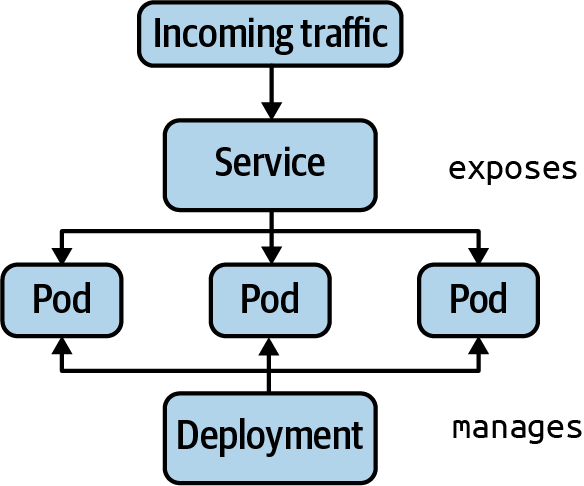
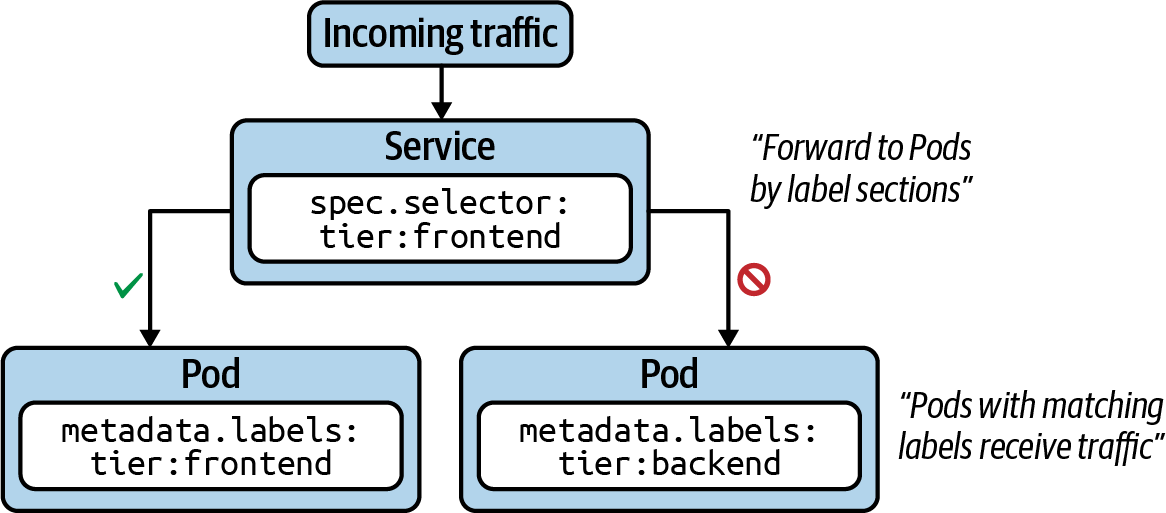
Services are one of the central concepts in Kubernetes. Without a Service, you won’t be able to expose your application to consumers in a stable and predictable fashion. In a nutshell, Services provide discoverable names and load balancing to Pod replicas. The services and Pods remain agnostic from IPs with the help of the Kubernetes DNS control plane component. Similar to a Deployment, the Service determines the Pods it works on with the help of label selection.
The following figure shows functionality. Pod 1 and Pod 2 receive traffic, as their assigned labels match with the label selection defined in the Service. Pod 3 does not receive traffic, as it defines non-matching labels. Note that it is possible to create a Service without a label selector for less-common scenarios.
Service Types
Every Service needs to define a type. The type determines how the Service exposes the matching Pods, as listed in the following table.
| Type | Description |
|---|---|
| ClusterIP | Exposes the Service on a cluster-internal IP. Only reachable from within the cluster. |
| NodePort | Exposes the Service on each node’s IP address at a static port. Accessible from outside of the cluster. |
| LoadBalancer | Exposes the Service externally using a cloud provider’s load balancer. |
Creating Services
As usual, we’ll look at creating a Service from both the imperative and declarative approach angles. In fact, there are two ways to create a Service imperatively.
The command create service instantiates a new Service. You have to provide the type of the Service as the third, mandatory command-line option. That’s also the case for the default type, ClusterIP. In addition, you can optionally provide the port mapping, which we’ll discuss a little later.
kubectl create service clusterip nginx-service --tcp=80:80
Instead of creating a Service as a standalone object, you can also expose a Pod or Deployment with a single command. The run command provides an optional --expose command-line option, which creates a new Pod and a corresponding Service with the correct label selection in place:
kubectl run nginx --image=nginx --restart=Never --port=80 --expose
For an existing Deployment, you can expose the underlying Pods with a Service using the expose deployment command:
kubectl expose deployment my-deploy --port=80 --target-port=80
Using the declarative approach:
apiVersion: v1
kind: Service
metadata:
  name: nginx-service
spec:
  type: ClusterIP
  selector:
    app: nginx-service
  ports:
  - port: 80
    targetPort: 80
Port Mapping
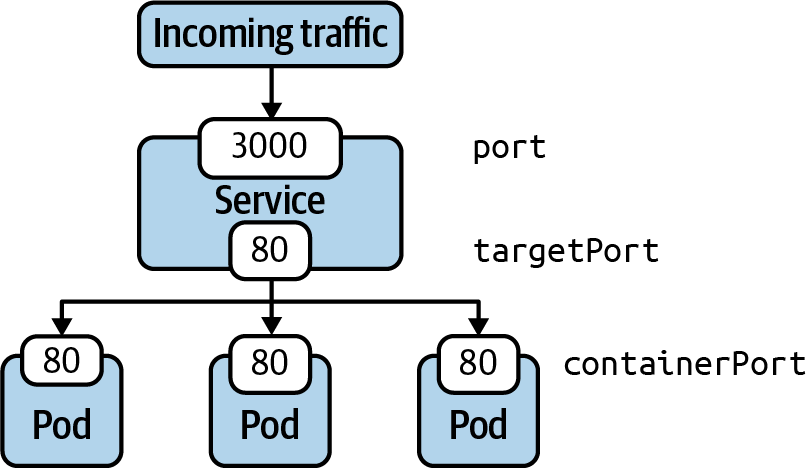
We briefly touched on the topic of port mapping. The correct port mapping determines if the incoming traffic actually reaches the application running inside of the Pods that match the label selection criteria of the Service. A Service always defines two different ports: the incoming port accepting traffic and the outgoing port, also called the target port. Their functionality is best illustrated by example.
The following figure shows a Service that accepts incoming traffic on port 3000. That’s the port defined by the attribute ports.port in the manifest. Any incoming traffic is then routed toward the target port, represented by ports.targetPort. The target port is the same port as defined by the container running inside of the label-selected Pod. In this case, that’s port 80.
Accessing a Service with Type ClusterIP
ClusterIP is the default type of Service. It exposes the Service on a cluster-internal IP address. The following figure shows how to reach a Pod exposed by the ClusterIP type from another Pod from within the cluster. You can also create a proxy from outside of the cluster using the kubectl proxy command.
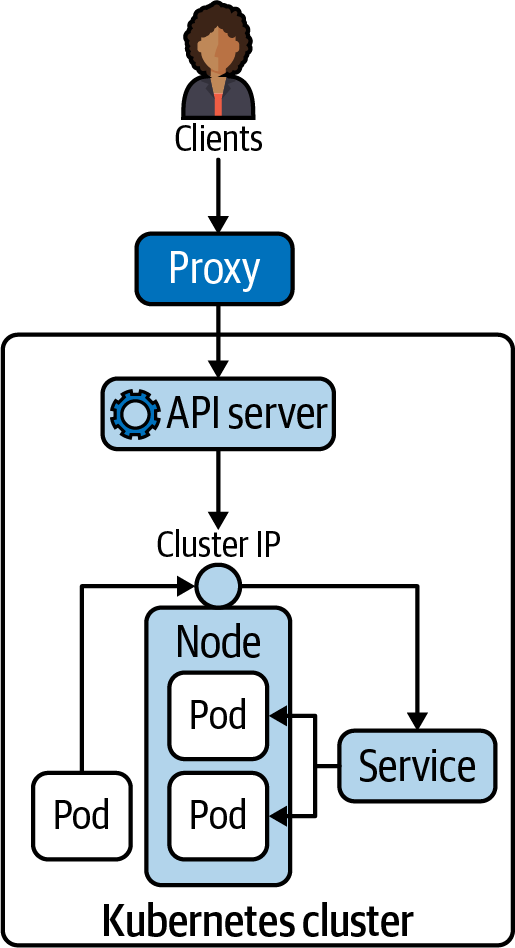
The proxy command can establish a direct connection to the Kubernetes API server from your localhost. With the following command, we are opening port 9999 on which to run the proxy:
kubectl proxy --port=9999
After running the command, you will notice that the shell is going to wait until you break out of the operation. To try talking to the proxy, you will have to open another terminal window. Say you have the curl command-line tool installed on your machine to make a call to an endpoint of the API server. The following example uses localhost:9999—that’s the proxy entry point. As part of the URL, you’re providing the endpoint to the Service named nginx running in the default namespace:
curl -L localhost:9999/api/v1/namespaces/default/services/nginx/proxy
Accessing a Service with Type NodePort
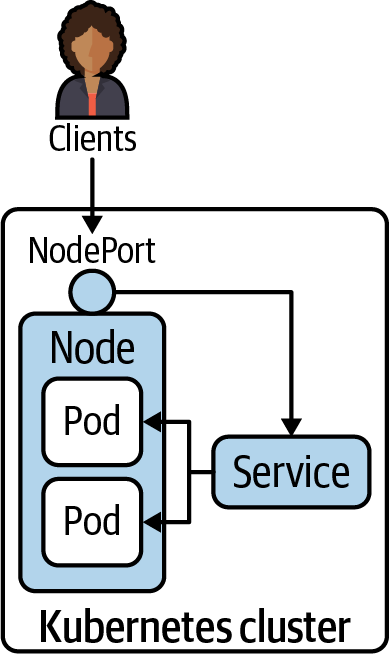
Declaring a Service with type NodePort exposes access through the node’s IP address and can be resolved from outside of the Kubernetes cluster. The node’s IP address can be reached in combination with a port number in the range of 30000 and 32767, assigned automatically upon the creation of the Service. The following figure shows the routing of traffic to Pods via a NodePort-typed Service.
We’ll change the existing Service named nginx to use the type NodePort instead of ClusterIP:
kubectl edit service nginx
curl localhost:<port-number>
Deployments and Services
A Deployment manages Pods and their replication. A Service routes network requests to a set of Pods. Both primitives use label selection to connect with an associated set of Pods.