Kubernetes Jobs
Understanding Jobs
A Pod is meant for the continuous operation of an application. You will want to deploy the application with a specific version and then keep it running without interrupts if possible.
A Job is a Kubernetes primitive with a different goal. It runs functionality until a specified number of completions has been reached, making it a good fit for one-time operations like import/export data processes or I/O-intensive processes with a finite end. The actual work managed by a Job is still running inside of a Pod. Therefore, you can think of a Job as a higher-level coordination instance for Pods executing the workload.
Upon completion of a Job and its Pods, Kubernetes does not automatically delete the objects—they will stay until they’re explicity deleted. Keeping those objects helps with debugging the command run inside of the Pod and gives you a chance to inspect the logs.
Kubernetes supports an auto-cleanup mechanism for Jobs and their controlled Pods by specifying the attribute spec.ttlSecondsAfterFinished.
apiVersion: batch/v1
kind: Job
metadata:
  name: counter
spec:
  template:
    spec:
      containers:
      - name: counter
        image: nginx
        command:
        - /bin/sh
        - -c
        - counter=0; while [ $counter -lt 3 ]; do counter=$((counter+1)); \
          echo "$counter"; sleep 3; done;
      restartPolicy: Never
Job Operation Types
The default behavior of a Job is to run the workload in a single Pod and expect one successful completion. That’s what Kubernetes calls a non-parallel Job. Internally, those parameters are tracked by the attributes spec.template.spec.completions and spec.template.spec.parallelism, each with the assigned value 1.
You can tweak any of those parameters to fit the needs of your use case. Say you’d expect the workload to complete successfully multiple times; then you’d increase the value of spec.template.spec.completions to at least 2. Sometimes, you’ll want to execute the workload by multiple pods in parallel. In those cases, you’d bump up the value assigned to spec.template.spec.parallelism. This is referred to as a parallel job.
Restart Behavior
The spec.backoffLimit attribute determines the number of retries a Job attempts to successfully complete the workload until the executed command finishes with an exit code 0. The default is 6, which means it will execute the workload 6 times before the Job is considered unsuccessful.
The Job manifest needs to explicitly declare the restart policy by using spec.template.spec.restartPolicy. The default restart policy of a Pod is Always, which tells the Kubernetes scheduler to always restart the Pod even if the container exits with a zero exit code. The restart policy of a Job can only be OnFailure or Never.
Restarting the Container on Failure
The following figure shows the behavior of a Job that uses the restart policy OnFailure. Upon a container failure, this policy will simply rerun the container.

Starting a New Pod on Failure
The following figure shows the behavior of a Job that uses the restart policy Never. This policy does not restart the container upon a failure. It starts a new Pod instead.

Understanding CronJobs
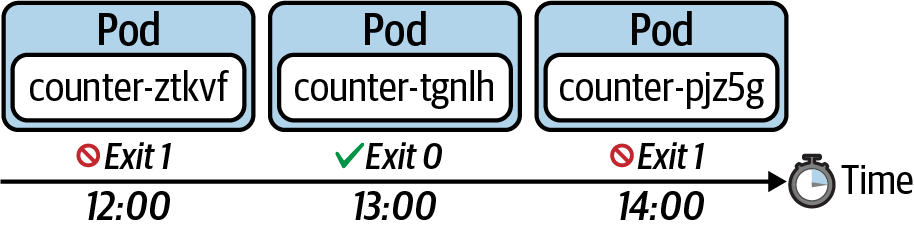
A Job represents a finite operation. Once the operation could be executed successfully, the work is done and the Job will create no more Pods. A CronJob is essentially a Job, but it’s run periodically based a schedule; however, it will continue to create a new Pod when it’s time to run the task. The schedule can be defined with a cron-expression you may already know from Unix cron jobs. The following figure shows a CronJob that executes every hour. For every execution, the CronJob creates a new Pod that runs the task and finishes with a zero or non-zero exit code.
Creating and Inspecting CronJobs
apiVersion: batch/v1beta1
kind: CronJob
metadata:
  name: current-date
spec:
  schedule: "* * * * *"
  jobTemplate:
    spec:
      template:
        spec:
          containers:
          - name: current-date
            image: nginx
            args:
            - /bin/sh
            - -c
            - 'echo "Current date: $(date)"'
          restartPolicy: OnFailure
If you list the existing CronJob with the get cronjobs command, you will see the schedule, the last scheduled execution, and whether the CronJob is currently active. It’s easy to match Pods managed by a CronJob. You can simply identify them by the name prefix. In this case, the prefix is current-date-:
kubectl get cronjobs
kubectl get pods
Summary
Jobs are well suited for implementing batch processes run in one or many Pods as a finite operation. Both objects, the Job and the Pod, will not be deleted after the work is completed in order to support inspection and troubleshooting activities. A CronJob is very similar to a Job, but executes on a schedule, defined as a Unix cron expression.